Évaluation complète des conditions de jeu s
Qu’est-ce que Mad Casino offre vraiment aux joueurs ?...

Daily attendance reports are essential for managing sales reps in Bangladesh. They track who’s working, where, and when, especially in busy hubs like Dhaka or Chattogram. Accurate records ensure your team stays productive and accountable in the field.
You can simplify attendance tracking with the right tools and formats. Excel templates, software like kothay.app, or Time Trax streamline the process. These solutions save time, reduce errors, and keep your sales team on track.
This guide covers everything you need for effective daily attendance reports. From Excel setups to software tips, I’ll share formats, templates, and Bangladesh-specific examples. You’ll find practical steps to create, customize, and share reports for your sales reps.

Let’s begin with the basics. A daily attendance report tracks your sales reps’ presence in the field. In Bangladesh, where sales teams often cover vast areas like Dhaka or Chattogram, these reports ensure accountability and boost productivity.
I find that a clear report improves efficiency. It shows where your reps are working, like markets in Gulshan or Sylhet. This helps you track their progress. A daily attendance report format in Excel can highlight active hours and client visits.
Payroll depends on accurate data. In Bangladesh, sales reps often earn commissions based on field time. A daily attendance report confirms hours worked. I’ve seen companies like bKash use these to ensure fair pay for their teams.
Compliance matters, especially for funded programs. For example, some Bangladeshi NGOs use CACFP-like systems for food programs. Accurate employee daily attendance reports ensure funding eligibility. A structured report prevents costly errors during audits.

Let’s discuss formats. Sales reps in Bangladesh need reports that suit their mobile work. Whether you’re in Rajshahi or Khulna, the right daily attendance report format saves time and keeps your team on track.
I rely on Excel for its versatility. A daily attendance report in Excel lets you add columns for names, dates, and client visits. Templates from Smartsheet are great for sales teams in Dhaka. You can customize them for daily use.
You need reports that are easy to share. PDF templates work well for emailing or printing. Jotform offers free daily attendance report templates. In Bangladesh, sales managers in Chattogram use these for quick updates with regional offices.
Every sales team is unique. A report for a pharmaceutical rep in Sylhet might include doctor visits. A retail rep in Banani might track store check-ins. I suggest customizing templates to match your team’s workflow.
Automation simplifies tracking. Tools like kothay.app, popular in Bangladesh, generate daily attendance reports for sales reps. I find these perfect for teams covering large areas like Narayanganj. They reduce manual work and ensure accuracy.

Let’s make an Excel report. You don’t need advanced skills. With a daily attendance report template, you’re set. I’ll guide you through steps tailored for sales reps in Bangladesh.
Open Excel and create a new spreadsheet. Add columns for rep names, dates, locations (like Dhanmondi), and client meetings. I recommend a notes column for details like “visited 5 shops in Mirpur.” Save it for daily use.
Excel formulas are a lifesaver. Use COUNTIF to tally client visits. For example, “=COUNTIF(D2:D50, ‘Completed’)” counts completed meetings. I find this useful for tracking sales reps in Barisal. It gives quick performance insights.
Add filters to sort by location or status. Color-code cells for clarity, like green for completed visits. For a Dhaka-based team, include fields for traffic delays. This makes your daily attendance report format in Excel practical and relevant.
Share your report easily. Export to PDF for emails to your Dhaka office. For printing a daily attendance report, use Excel’s print preview to adjust layouts. Ensure fonts are clear for professional reports shared with managers.

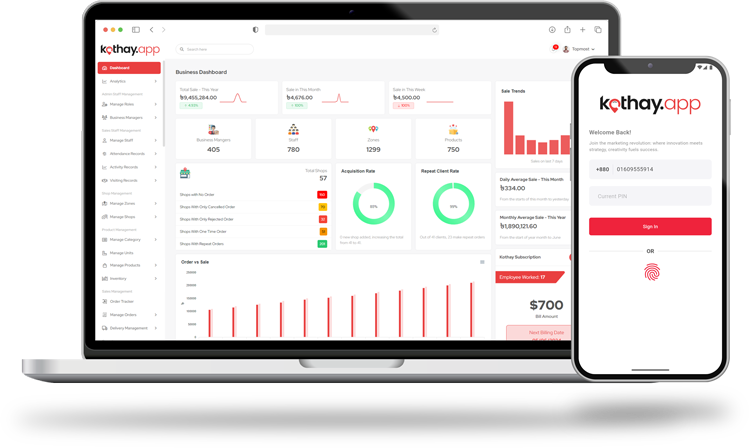
kothay.app is a top choice in Bangladesh. It simplifies tracking for sales reps. I’ve seen teams in Gazipur use it effectively. Let’s explore how it helps create daily attendance reports.
Log into kothay.app and go to the attendance dashboard. Enter rep details, like locations visited in Savar. The platform compiles data instantly. You can view daily or weekly reports, perfect for busy sales managers.
Select the daily attendance report option. Customize by date or rep. kothay.app exports to PDF or Excel. I find this feature great for sharing with supervisors in Chattogram. It saves time and ensures accuracy.
To print, select your report and click “Print.” Adjust settings for clarity. Ensure all rep names and locations are visible. kothay.app’s clean layout suits professional employee daily attendance reports. Save digital copies for records.
Data sync issues can occur. Check your input settings. Ensure all check-ins are logged. I helped a manager in Khulna resolve a glitch by refreshing kothay.app’s dashboard. Reddit forums offer quick tips for troubleshooting.
Some Bangladeshi organizations use CACFP-like systems for meal programs. Sales reps may need similar reports for allowances. I’ll explain how to create these for your team.
CACFP-style reports track meal counts and attendance. In Bangladesh, sales reps may get meal allowances. Record who eats and when. I suggest using a CACFP average daily attendance for food report template for accuracy.
Use a spreadsheet or kothay.app. List rep names, dates, and meal counts. Calculate weekly averages. I find Excel templates from OSSE’s website work well. Ensure data is clear to avoid funding or allowance disputes.
Submit reports to your finance team. Digital platforms like kothay.app simplify sharing. I’ve seen Bangladeshi firms streamline submissions this way. Keep backups for audits to ensure compliance with internal policies.
Verify data daily. Cross-check meal logs with attendance. I recommend training reps to log meals consistently. Errors can delay allowances. A clear daily attendance report template reduces mistakes and saves time.

Time Trax is great for tracking sales reps. It’s widely used in Bangladesh for employee hours. I’ll show you how it creates a time trax attendance tracking daily report.
Time Trax logs clock-in and clock-out times. Reps in Rajshahi can check in via mobile. The system compiles data into reports. I find it ideal for ensuring payroll accuracy for field teams.
Select the daily report option in Time Trax. Customize by rep or date. Export to Excel or PDF. I’ve seen managers in Dhaka use this for quick payroll updates. It’s efficient and reliable.
Time Trax syncs with payroll software. This ensures accurate salary calculations. I suggest testing integrations for smooth data flow. It simplifies reporting for sales teams across Bangladesh.
Time Trax suits mobile sales teams. Compare it with kothay.app for features. Reddit reviews praise its ease of use. I recommend it for businesses in Sylhet needing a time trax attendance tracking daily report.

In Bangladesh, some sales teams work in retail or hospitality. A room attendant daily report format can inspire sales tracking. I’ll explain how to adapt it for reps.
List reps’ names, shift times, and client visits. Include locations like Banani shops. Add a column for issues, like client complaints. I find this format helps managers in Dhaka track performance.
Templates streamline reporting. Adapt a room attendants daily report template from Vertex42. I suggest adding fields for sales calls. Excel templates are easy to update for daily use in Chattogram.
Track visits alongside attendance. This evaluates rep performance. I recommend weekly reviews to spot trends, like missed calls in Mirpur. A clear report format keeps data actionable.
Share reports via email or kothay.app. Digital tools simplify communication. I’ve seen Bangladeshi firms improve efficiency with digital reports. Ensure clarity for quick decision-making by supervisors.
Some Bangladeshi organizations use MDM-like systems for meal programs. Sales reps may need similar reports for allowances. I’ll show you how to create an MDM daily attendance report for reps.
MDM-style reports track attendance and meals. In Bangladesh, reps may log meal allowances. A clear report ensures accurate records. I suggest a template to standardize data for your team.
Use Excel or an app. List rep names, dates, and meal counts. Templates from Someka are printable and editable. I find them useful for teams in Barisal. Ensure data accuracy before submission.
Submit reports to your finance team. Digital platforms streamline this. I recommend backing up data. Errors can delay allowances. A clear daily attendance report format saves time and reduces mistakes.
Train reps to log data daily. Use digital tools to minimize errors. I’ve seen teams in Khulna use apps for MDM-style reports. Consistency ensures compliance and smooth allowance processing.

Let’s wrap up with tips. These practices work for any employee daily attendance report. I’ve tested them with sales teams in Bangladesh. They’ll help you manage your reps effectively.
Keep reports straightforward. Use fields like name, date, and location. I suggest avoiding clutter for teams in Dhaka. A clean daily attendance report template ensures quick understanding and fewer errors.
Automation saves effort. Tools like kothay.app generate reports fast. I find them ideal for sales teams in Sylhet. They reduce manual errors and keep your data reliable.
Review reports weekly. This catches issues early. I once spotted a payroll error for a rep in Gazipur. Regular checks ensure your employee daily attendance reports are accurate and actionable.
Ensure reps know your system. I recommend short training sessions in Chattogram. Clear instructions prevent errors. This is key for consistent reporting across your Bangladeshi sales team.
It tracks sales reps’ presence and client visits. Used in Bangladesh, it ensures accountability. It’s vital for payroll and performance reviews.
Open Excel, add columns for names, dates, and locations. Use COUNTIF for summaries. Customize for reps in Dhaka. Save as a template.
Yes, kothay.app creates daily attendance reports. Customize by rep or date. Export to PDF or Excel. It’s ideal for teams in Chattogram.
It lists rep names, dates, and meal allowances. Use a template for accuracy. Submit to finance for funding or allowance processing.
Time Trax logs clock-in times for reps. It creates a time trax attendance tracking daily report. It ensures payroll accuracy for teams.
You now have the tools to master daily attendance reports for your sales reps in Bangladesh. Use Excel, kothay.app, or Time Trax to streamline tracking. Customize templates, automate processes, and train your team.
Visit Kothay App to explore solutions that simplify reporting. Take charge of your sales team’s attendance today!
Sign up now to simplify your sales operations, improve productivity, and make data-driven decisions. Choose your plan, add your team, and unlock the full potential of your sales strategy. Don’t wait – elevate your sales management game and drive success with us!
Get Started